Import your talking video
Choose a local video from your Mac and let TextCut prepare it for review.
TextCut turns your video into a timestamped transcript, marks filler words, repeats, and long pauses, then lets you review and export a clean rough cut.
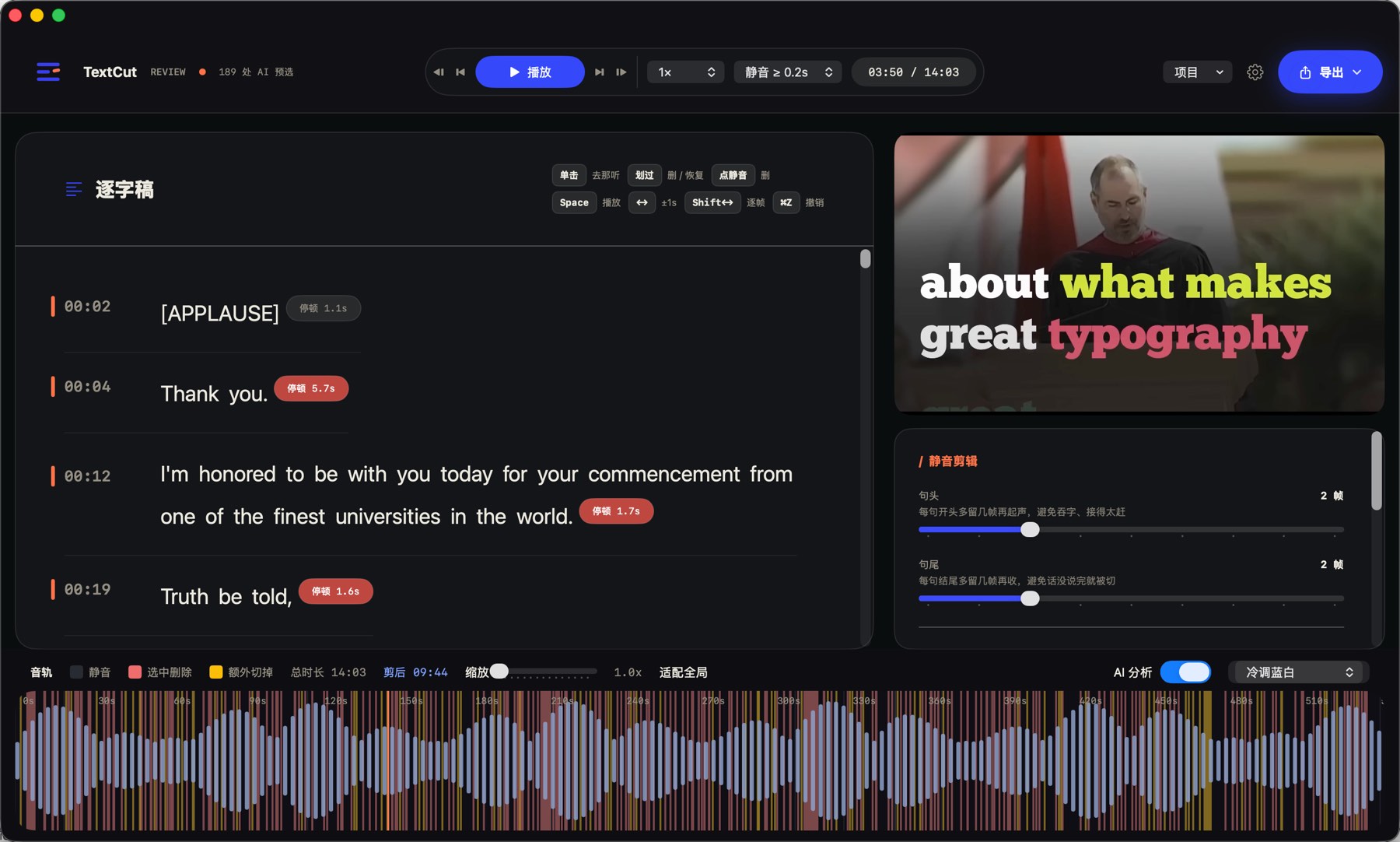
A transcript-first workspace for reviewing spoken video before your final edit.
The problem
Finding mistakes, filler words, repeated takes, and awkward pauses is the slowest part of editing spoken videos. TextCut moves that work from the timeline into a transcript you can read, review, and cut.
Select words, pauses, or repeated phrases in the transcript. TextCut maps every edit back to the video timeline, so your rough cut follows your text decisions.
Workflow
TextCut is designed for the part of editing that happens before captions, music, graphics, and final polish.
Choose a local video from your Mac and let TextCut prepare it for review.
Every word is aligned to timing so the transcript becomes a real editing surface.
Filler words, repeated speech, long pauses, and weak spoken segments are highlighted before review.
Watch the clip, read the transcript, inspect pauses, and confirm what should be removed.
Export video, subtitles, FCPXML, or review data for the next step in your editing workflow.
Features
Edit spoken video by reading it. Jump to any word, select what should go, and keep your focus on the actual speech.
TextCut helps identify filler words, repeated takes, long pauses, and low-value spoken segments so you can review faster.
Video playback, transcript, selected cuts, timing controls, and waveform live together.
Export MP4, MOV, SRT, FCPXML, edited subtitles, review data, and cut lists for your existing creator workflow.
Use cases
Clean up repeated takes and awkward pauses before final editing.
Find strong segments and remove filler speech faster.
Tighten explanations without manually hunting through the timeline.
Prepare a clean rough cut before adding captions, music, and effects.
Local-first
TextCut is designed around local video files and local project documents. Use local transcription when privacy matters, or choose cloud-assisted analysis when you want stronger cleanup suggestions.
FAQ
No. TextCut focuses on the rough cut: removing filler words, repeated speech, pauses, and weak segments before you continue in your main editor.
No. TextCut prepares a cleaner spoken-video cut that you can export and continue editing elsewhere.
Talking-head videos, tutorials, courses, interviews, podcast clips, and short-form creator videos with spoken content.
TextCut is designed with local-first workflows. Local transcription is available, and cloud-assisted features can be used when you choose stronger analysis.
TextCut is available for Mac creators who want a faster way to rough-cut spoken videos before final editing.